Python: Reading Input from the Console

♠ Posted by Unknown in

Reading Input from the Console in Python


The input() function asks the user to input a value for the variable. Default value entered as a string. 

Python: Writing a Simple Program

♠ Posted by Unknown in

Writing a Simple Program in Python


Start Python IDLE from Start menu à Python Group. Write a program in New File window as shown below.

Python Sample Program

Run program, Select Run (F5) from Run menu.

Output:


>>> ========RESTART =========
>>> 
The Area of Circle :  1256.0

Python: Comments

♠ Posted by Unknown in

Comments in Python


In Python, comments are preceded by a pound sign (#) on a line, called a line comment, or enclosed between three consecutive single quotation marks (''') on one or several lines, called a paragraph comment. When the Python interpreter sees #, it ignores all text after # on the same line. When it sees ''', it scans for the next ''' and ignores any text between the triple quotation marks.

For Example:

# This program displays one message


''' This program displays
   Two messages
'''

Line Continuation Symbol in Python

In some cases, the Python interpreter cannot determine the end of the statement written in multiple lines. We can place the  line continuation character (\) at the end of the line to tell the interpreter that the statement is continued on the next line. For example, the following statement

fact = 1 * 2 * 3 * 4 * \
          5 * 6
is equivalent to
fact = 1 * 2 * 3 * 4 * 5 * 6

Python: Creating Source Code Files

♠ Posted by Unknown in

Creating Source Code File in Python


Entering Python Statement at the statement prompt >>> is convenient, but the statements are not saved. To save statements for later use, you can create a python file to store the statements. The file can be created using editor, that file is called a Python source file or script file, or module. By convention, Python files are named with the extension .py.

Running a Python program from a script file is known as running Python in script mode. Typing a statement at the statement prompt >>> and executing it is called Python in  interactive mode.

To create new Python file in IDLE, select file menu à New File. It opens new file window type following lines and save it as “Example01.py”. Now Click Run (F5) from Run menu of window. Control transfer to IDLE statement prompt and show the output.


Example:

Example01.py

#Display two messages
print(“Welcome to world of Python…”)
print(“Hello Friends…”)


Python: Getting Started

♠ Posted by Unknown in

Getting Started with Python


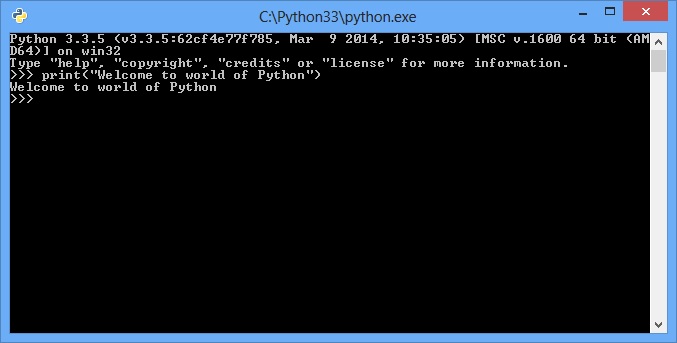
Let’s get started by writing a simple Python program that displays the message “Welcome to world of Python…” on the console.

Assume you have Python installed on the OS. You can start Python in a command window by typing “Python” at the command prompt, as shown in below figure. Or by using IDLE, as shown in another figure. IDLE (Interactive DeveLopment Environment)is an Integrated Development Environment (IDE) for Python.

Python Command line figure


Python command-line and IDLE can also be accessed directly from the Windows Start menu and in Python group.

Python IDLE window

Python: History

♠ Posted by Unknown in

Python: History

                   
Since 1990, Python was created by Guido van Rossum in the Netherland and was named after well-known British Monty Python’s Flying Circus. Rossum developed Python as a hobby, and Python has become a popular programming language widely used in industry and academia due to its simple, concise, and intuitive syntax and extensive library.

Python is a general-purpose programming language. That means you can use Python to write code for any programming task. Python is now used in the Google Search Engine, in mission-critical projects at NASA, and in transaction processing at the New York Stock Exchange.

Python is interpreted, which means that Python code is translated and executed by an interpreter.

Python is an  object-oriented programming (OOP) language. Data in Python are objects created from classes. 

Adv Java - [Java Server Page: Session Management]

♠ Posted by Unknown in

Java Server Page Session Management

The HTTP is stateless protocol. The state management is a necessary management technique to preserve current page data from moving one page to another page. The Session management is one type of state management to maintain particular user login/logout session tracking. The Session is created individually for every particular user who are getting logged in/out on website.

Adv Java - [Java Server Page Directive]

♠ Posted by Unknown in

Java Server Page Directive

This example is showing the use of directives to import libraries of java into java server page code. Here, I have called util package of java library to fetch data from the html table.

Adv Java - [Java Server Pages: Scripting Elements]

♠ Posted by Unknown in

JSP Scripting Elements


Once the directives have been used to setup the scripting environment you can utilize the scripting language elements. JSP1.1. has three scripting language elements – declaration, scriptlets, and expressions. A declaration will declare elements, a scriptlet is a statement fragment, and an expression is a complete language expression. In JSP each scripting element begins with a “<%”. 

Adv Java - [Servlet: Hidden Field]

♠ Posted by Unknown in

Hidden Field in Servlet Example

The HTTP is stateless protocol, means it can not preserve data of current web page while moving backward/forward web pages. The hidden field is a way to State management in servlet example. The hidden field is used to store intermediate data hide while moving from one page to another page.  

Adv Java - [Servlet: Database Connectivity]

♠ Posted by Unknown in

DataBase Connectivity on Servlet

This example is showing the DataBase connectivity to fetch the result of particular student from the SQL Table. DataBase may resides on server-side and establish ODBC connection between database and Java class.

Adv Java - [Servlet: Hyperlink Example]

♠ Posted by Unknown in
Servlet Example

The Example that display the use of hyperlinks among several servlets. The Servlets are called to each other by referencing the java class name to the anchor element of HTML.

Adv Java - [Servlet: Useful Methods]

♠ Posted by Unknown in

Useful Methods of Servlet

 Servlets are simply Java classes that follow three basic rules:

  1. An HTTP Servlet must extend javax.servlet.http.HttpServlet (or extend an abstract class that does).
  2. The Servlet must implement at least one of the following metheods: doGet(), doPost(), doPut(), doDelete(), init(), destroy(), or service().
  3. The Servlet can optionally implement init(), destroy(), or getServletInfo().

Adv Java - [Servlet: Multithreaded]

♠ Posted by Unknown in

Multithreading into Servlet


The servlet container has a pool of threads that it will dispatch to handle client requests. It is quite likely that two clients arriving at the same time could be processing through your service() at the same time. Therefore the service() method must written in a thread-safe manner. Any access to common resources will need to be guarded by using the synchronized keyword.

Adv Java[Servlet: Session Management]

♠ Posted by Unknown in

Servlet Session Management


HTTP is a “sessionless” protorcol, so you cannot tell from one server hit to another if you’ve got the same person repeatedly querying your site. Or if it is a completely different person. A great deal of effort has gone into mechanisms that will allow Web developers to track sessions. Companies could not do e-commerce without keeping track of a client and the items they have put into their shopping cart, for example.

Adv Java [Servlet: Life Cycle]

♠ Posted by Unknown in

Servlets


Client access from the Internet or corporate intranets is a sure way to allow many users to access data and resources easily. This type of access is based on clients using the World Wide Web standards of Hypertext Markup Language (HTML) and Hyper Text Transfer Protocol (HTTP). The Servlet API set abstracts a common solution framework for responding to HTTP requests.

Adv Java - [JDBC: Example on Applet]

♠ Posted by Unknown in

JDBC Connection on Applet

This program is related to JDBC Connectivity on Applet. Program is written into directly Notepad Editor. So, Designing of program is basically shows how to use Layout Manager properly to fit the controls on desired place.

Adv Java - [JDBC: Resultset Types]

♠ Posted by Unknown in

JDBC Resultsets

Before JDBC 2.1, a ResultSet object created by executing a statement was, by default, forward-only scrollable. That is, we could traversse through the resultset using the next() method only. next() returns false when the last record is reached, and no more details can then be retrieved.

Adv Java - [JDBC: Prepared Statement]

♠ Posted by Unknown in

JDBC Prepared Statement

JDBC prepared statements address the following requirements:
  1. Creating parametrerized statements such that data for parameters can be substituted dynamically.
  1. Creating statements involving data values that cannot always be represented as character strings.
  1. Pre-compiling SQL statements to avoid repeated compiling of the same SQL statements.